
Web-to-print packaging is how print businesses are finally meeting a buyer expectation that is already standard everywhere else online upload a design, see an accurate preview, get an instant price, and order, with no sales call and no two-day wait for a quote.
Packaging buyers do not want to call a sales rep, wait on a manual quote, and go back and forth over email to approve a proof. They want the same self-service experience they already get from apparel and business card sites. That expectation is now reaching custom packaging and web-to-print packaging is the model that delivers it.
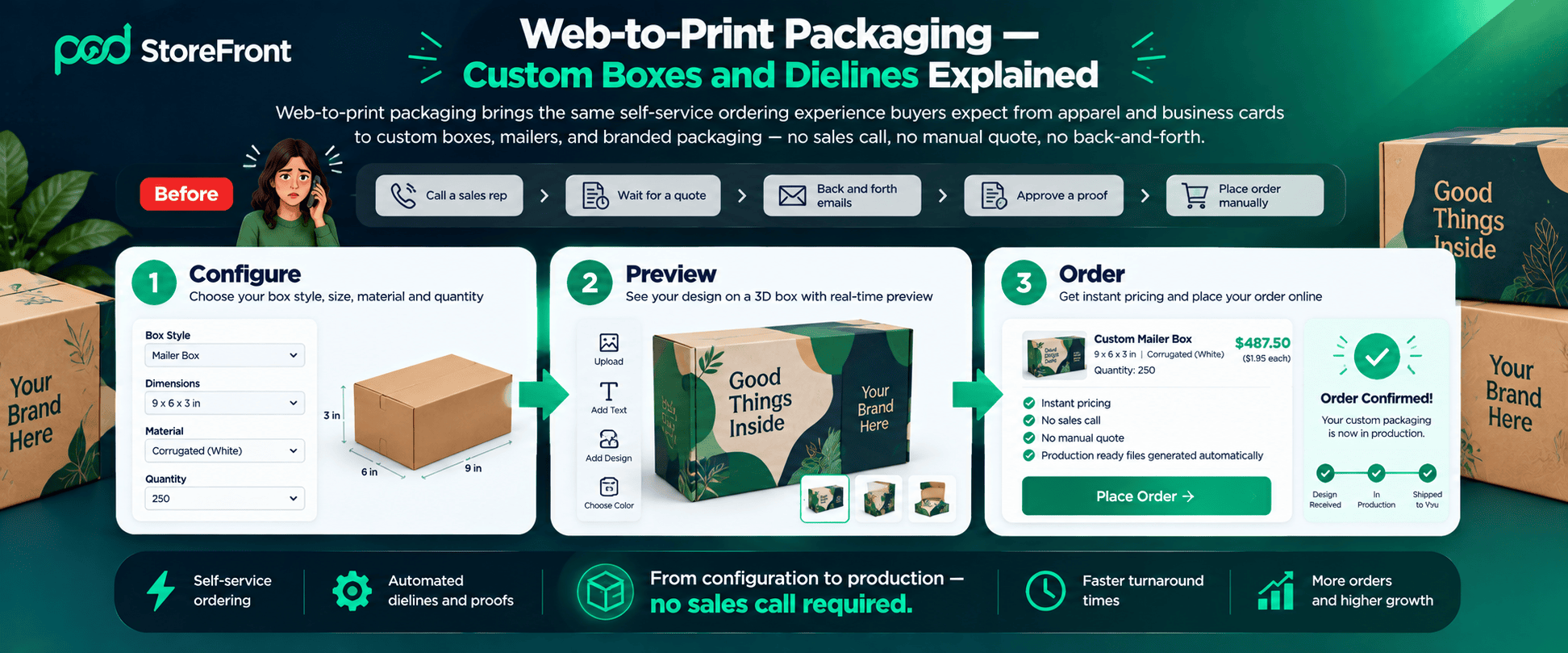
This guide covers what web-to-print packaging actually involves, how dielines fit into an online ordering workflow, and how to set up a packaging storefront that does not require a manual quote for every order in 2026.
According to Packaging Digest, branded and design-forward packaging has become a genuine purchase and loyalty driver — not just protective material as ecommerce brands increasingly treat the unboxing experience as part of their marketing. Web-to-print packaging is the technology model that makes that demand self-serviceable at scale.
Table of Contents
- What Is Web-to-Print Packaging?
- Dielines: The Foundation of Web-to-Print Packaging
- 7 Steps to Set Up Web-to-Print Packaging
- Why Packaging Is a Growing Opportunity for Print Businesses
- Common Mistakes With Web-to-Print Packaging
- Frequently Asked Questions
What Is Web-to-Print Packaging?
Web-to-print packaging applies standard web-to-print technology online storefronts, live product customisation, automated file generation to the packaging category specifically: custom boxes, mailers, pouches, labels, and other branded packaging products ordered and customised entirely online rather than through a traditional quote-and-proof sales cycle.
The core difference between web-to-print packaging and most other web-to-print categories is structural complexity. A business card is flat. A box folds, has multiple panels, and needs to look right both as a 2D printed sheet and as a 3D folded structure. That complexity is exactly why packaging has lagged behind apparel and stationery in going fully self-service and exactly why getting web-to-print packaging right is a meaningful competitive edge for print businesses that do.
For print businesses evaluating where web-to-print packaging fits within their broader platform strategy, see our web-to-print platform evaluation checklist packaging capability is one of the evaluation points that separates genuinely capable platforms from those built only for flat print products.
Dielines: The Foundation of Web-to-Print Packaging
A dieline is the flat, unfolded template that shows exactly where a box’s cuts, folds, and panels fall the blueprint a design has to follow for the finished product to assemble correctly. Getting dielines right is the single most technical part of offering web-to-print packaging online because a design that looks correct on a flat preview can be completely wrong once folded if it does not respect the dieline’s panel boundaries, bleed areas, and fold lines.
For a web-to-print packaging storefront, the underlying system needs to do three things:
Map Designs Accurately to the Dieline Template
The customer’s uploaded artwork, text, or logo must land on the correct panel without manual adjustment by your team. A web-to-print packaging system that requires manual file correction for every order has not solved the automation problem it has just moved it later in the workflow.
Show a True-to-Life Folded Preview
A flat proof is not enough for web-to-print packaging. Customers need to see how their design looks once the box is actually folded into its final shape or they will approve something that does not match what arrives. The folded preview is not optional in web-to-print packaging the way it might be for a flat product.
Handle Standard Box Styles as Reusable Templates
Most web-to-print packaging orders fall into a manageable set of common structures mailer boxes, tuck-end boxes, pouches so a platform built around dieline templates for these standard styles can serve the majority of packaging demand without custom engineering for every single order.
If you want a deeper primer on dieline structure before building your own templates, the Paperboard Packaging Council’s design resources and the AIGA packaging design guidelines are both solid starting points for understanding panel, fold, and bleed conventions used across the industry.
Getting dielines wrong in a web-to-print packaging setup does not just produce a box that looks slightly off it can produce a box that physically does not close, a logo that gets cut in half across a fold, or text that ends up on the inside of a flap where no one will ever see it. These errors are invisible on a flat 2D proof and only become obvious once the box is assembled which is exactly why a true folded preview matters so much more for web-to-print packaging than for almost any other print category.
7 Steps to Set Up Web-to-Print Packaging
Step 1 — Start With a Manageable Set of Box Styles
Do not try to offer every possible packaging structure on day one. Launch your web-to-print packaging operation with the handful of styles that cover the bulk of demand standard mailer boxes, tuck-end boxes, simple pouches and expand into more specialised structures once the core offering is working smoothly.
Step 2 — Build or Source Accurate Dieline Templates
Each box style needs a precise dieline template behind it the structural blueprint that defines where panels, folds, and bleed areas sit. This is the technical foundation everything else in your web-to-print packaging setup depends on. An inaccurate dieline produces boxes that do not assemble correctly no matter how good the printed design looks.
Step 3 — Add a Live Product Customiser
A customer designing web-to-print packaging needs to see their actual design on the actual box structure — not a generic stock photo. A storefront with a live product customiser lets a buyer upload artwork, adjust placement, and preview the result before ordering — closing the gap between what they expect and what actually prints.
On platforms like PODStoreFront, live customisation is part of the same system handling the storefront and fulfillment so web-to-print packaging does not need a separately bolted-on design tool. The same live 3D preview capability that reduces cart abandonment on personalised apparel applies directly to web-to-print packaging see our guide on how to reduce cart abandonment for how preview quality drives purchase confidence.
Step 4 — Automate Pricing by Size, Material, and Quantity
Web-to-print packaging pricing has more variables than most web-to-print categories box dimensions, material thickness, finish, and order quantity all affect cost. Automated pricing rules that calculate a real-time price based on these inputs remove the need for a manual quote on every order which is the entire point of taking web-to-print packaging online in the first place.
The CPQ (Configure, Price, Quote) logic that powers accurate automated packaging pricing is covered in detail in our guide to CPQ software for print businesses the same principles apply directly to web-to-print packaging pricing complexity.
Step 5 — Set Up Print-Ready File Generation
Once a design is approved in your web-to-print packaging workflow, the system should automatically generate a print-ready file that correctly accounts for bleed, fold lines, and the dieline structure rather than requiring a production team member to manually prep every file before it goes to press.
Step 6 — Offer Custom Sizing Where It Matters
Standard sizes cover most web-to-print packaging demand but packaging buyers frequently need a non-standard dimension for a specific product. A storefront that lets customers configure a custom size within sensible production constraints rather than requiring a manual quote request captures orders that would otherwise bounce to a competitor offering self-service custom sizing.
Step 7 — Route Approved Orders Straight to Production
Once a design is approved and priced, the web-to-print packaging order should move directly into your production queue without a separate manual re-entry step. This is where web-to-print packaging earns its real value over a traditional sales-and-quote process the order placed online is the order that goes to press, no middle step required.
Together, these seven steps turn web-to-print packaging from a category that depends on a sales team’s availability into one that can take orders around the clock. A customer configuring a box at 11pm on a Sunday does not need to wait for your team to open Monday morning the pricing, proofing, and production handoff all happen automatically.
For print businesses managing web-to-print packaging across multiple locations or client accounts, see our guide on managing multiple print shop locations with one platform the same centralised management principles apply directly to multi-client packaging operations.
Why Packaging Is a Growing Opportunity for Print Businesses?
Custom and branded web-to-print packaging demand has grown steadily as ecommerce brands increasingly treat the unboxing experience as part of their marketing not just a shipping necessity. That demand is currently underserved by self-service ordering. Most packaging buyers still go through a traditional quote process which means a print business offering genuine web-to-print packaging has a real differentiation opportunity against competitors still requiring a phone call or email to get a price.
The technical difficulty of dielines and structural accuracy is also exactly what keeps many print businesses from offering web-to-print packaging online which means the ones that do stand out clearly against competitors still quoting manually.
There is a compounding effect too. Once a print business has built accurate dieline templates and automated pricing for one box style, extending that same system to a second or third style is far faster than the initial build since the underlying customiser, file generation, and production routing logic are already in place. The hardest part of web-to-print packaging is the first working template, not the tenth.
For print businesses thinking about how web-to-print packaging fits alongside their existing B2B client relationships, see our guide to B2B vs B2C web-to-print workflows corporate packaging buyers have distinct ordering workflow requirements that a genuine B2B portal handles significantly better than a standard consumer storefront.
Common Mistakes With Web-to-Print Packaging
Launching With Too Many Box Styles at Once
Supporting a huge range of structures from day one spreads technical effort thin and increases the odds of dieline errors in your web-to-print packaging setup. Start narrow, prove the workflow, then expand.
Showing Only a Flat Proof — Never a Folded Preview
A customer who approves a flat design without seeing it folded is far more likely to be surprised and unhappy by the finished web-to-print packaging product. The folded preview is not optional for web-to-print packaging the way it might be for a flat product.
Underpricing Complex or Custom Sizes
Web-to-print packaging production cost scales with size, material, and complexity in ways that are easy to underestimate if your pricing rules were built around simpler product categories. Review packaging-specific pricing separately from your standard product pricing logic. Our guide to print on demand pricing and profit margins covers the margin calculation principles that apply equally to web-to-print packaging pricing.
Treating Packaging Like Just Another SKU in a General Print Catalog
Web-to-print packaging structural complexity means it often needs its own dieline templates, its own preview logic, and sometimes its own pricing rules. A generic print-product setup applied without adjustment tends to produce avoidable errors that undermine the self-service promise of web-to-print packaging.
Frequently Asked Questions
Q. What is a dieline in web-to-print packaging?
Ans. A dieline is the flat, unfolded template showing exactly where a box’s cuts, folds, and panels fall. It is the structural blueprint a design must follow in a web-to-print packaging setup so the finished, folded product assembles correctly. Getting dielines right is the most technically demanding part of offering web-to-print packaging online an inaccurate dieline produces boxes that do not assemble correctly regardless of how good the printed design looks.
Q. Can web-to-print packaging be sold through a fully self-service storefront?
Ans. Yes — for standard box styles with accurate dieline templates behind them. Fully custom or highly specialised structures may still require a quote, but the bulk of common web-to-print packaging demand mailer boxes, tuck-end boxes, pouches can be handled through automated pricing and a live customiser without manual sales involvement.
Q. Why is web-to-print packaging harder to set up than apparel or business cards?
Ans. Web-to-print packaging is a 3D structure built from a 2D printed sheet which means the system has to account for folds, panels, and bleed areas accurately and ideally show a folded preview, not just a flat proof. Flat products like business cards do not carry this structural complexity, which is why web-to-print packaging requires more technical setup than most other web-to-print categories.
Q. Do customers need design software to order web-to-print packaging online?
Ans. No — a live product customiser in a web-to-print packaging storefront lets customers upload their own artwork and adjust it directly on the box structure in the browser, without needing separate design software. The customiser handles the dieline mapping and preview generation automatically, so the customer experience is self-service without requiring technical design knowledge.
Q. How does automated pricing work for web-to-print packaging?
Ans. Pricing rules in a web-to-print packaging system calculate cost in real time based on inputs like box dimensions, material, finish, and order quantity replacing the manual quote process that is standard for packaging orders at most print businesses. This is the CPQ (Configure, Price, Quote) logic that makes web-to-print packaging genuinely self-serviceable rather than just a digital front end for the same manual quoting process.
Ready to add web-to-print packaging to your print business offering? Explore PODStoreFront — the all-in-one web-to-print platform with live product customisation, automated pricing, print-ready file generation, and B2B portal management in one no-code dashboard.

Leave a Reply