
Quick answer: Conversion rate optimization, or CRO, is the process of turning more of your existing visitors into buyers. Start by measuring your conversion rate, find the step where most shoppers leave, fix the basics such as speed, product pages and checkout, then test one change at a time.
This guide to conversion rate optimization for ecommerce gives beginners a clear order of work, simple checklists and a 30-day plan.
Table of Contents
- What Is Conversion Rate Optimization?
- Why Conversion Rate Optimization Matters
- Know Your Conversion Rate Optimization Numbers
- Find Where Visitors Drop Off
- Conversion Rate Optimization Quick Wins
- A Product Page Checklist for Higher Conversion
- A Checkout Checklist
- How to Run Your First Conversion Rate Optimization Test
- Prioritize With a Simple Scoring Method
- Conversion Rate Optimization for Custom and Print on Demand Stores
- Use Customer Feedback to Guide Conversion Rate Optimization
- Pricing, Offers and Shipping Strategy
- Bring Visitors Back With Email and Retargeting
- Common Conversion Rate Optimization Mistakes
- A 30-Day Conversion Rate Optimization Plan
- Choose a Platform That Supports Conversion Rate Optimization
- Frequently Asked Questions
- The Bottom Line
What Is Conversion Rate Optimization?
Conversion rate optimization is the practice of improving your website so a higher share of visitors complete a goal. For an online store, the main goal is a purchase.
The basic formula is simple: conversion rate equals orders divided by sessions, multiplied by 100.
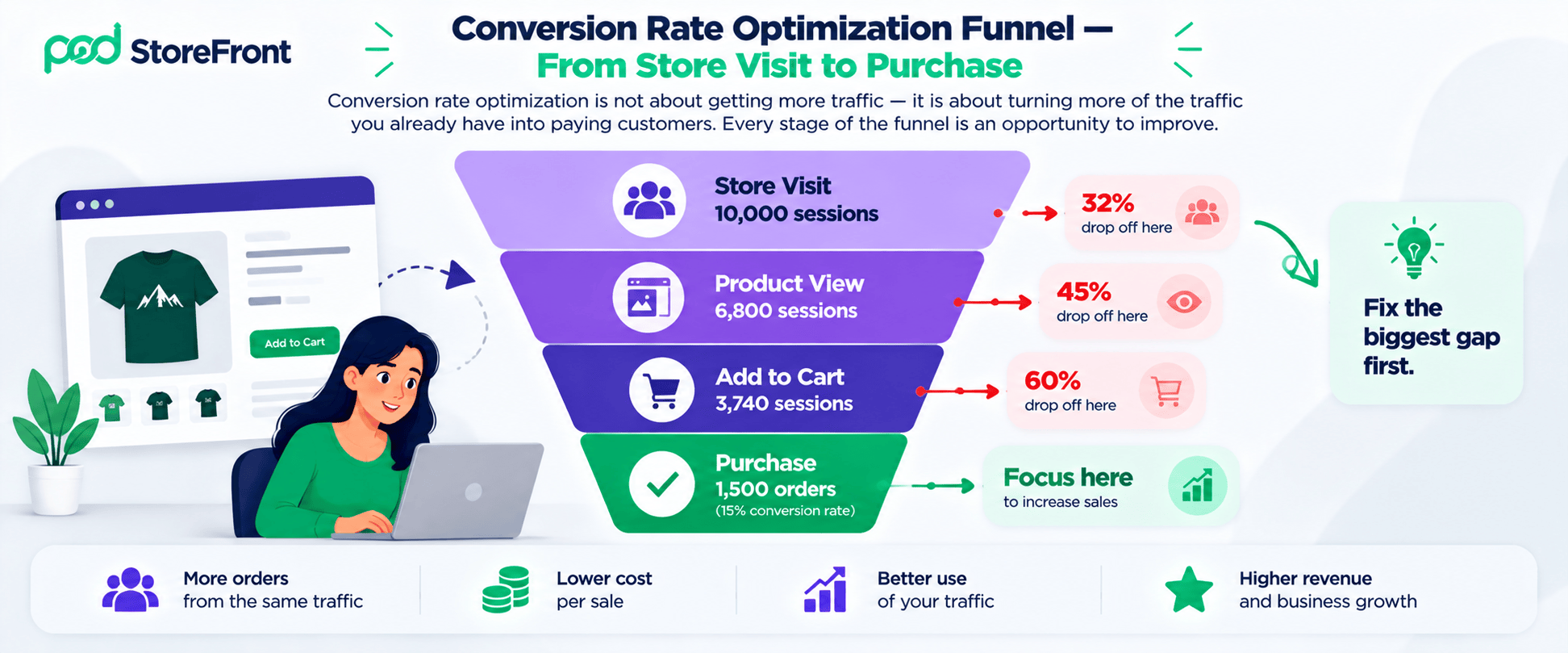
Suppose your store gets 10,000 sessions and 200 orders in a month. Your conversion rate is 2%. If better pages lift it to 2.5%, you get 250 orders from the same traffic. That is 25% more orders without buying a single extra click. These numbers are an example — use your own.
Why Conversion Rate Optimization Matters?
Most stores spend heavily to bring in traffic. Conversion rate optimization makes every visitor more valuable.
- Lower cost per sale: More orders from the same ad spend.
- Better use of traffic: Fixes help every channel at once.
- Compounding gains: Small improvements stack up over time.
- Customer insight: Testing shows what shoppers care about.
Traffic and conversion rate optimization work together. Our guide to the ecommerce SEO checklist brings visitors in — and conversion rate optimization helps them buy.
Know Your Conversion Rate Optimization Numbers
You cannot improve what you do not measure. Track these metrics weekly.
| Metric | What it tells you |
|---|---|
| Conversion rate | Share of sessions that end in an order |
| Add-to-cart rate | How persuasive product pages are |
| Cart abandonment rate | How many carts never become orders |
| Checkout completion rate | How smooth the final steps are |
| Average order value | How much each order is worth |
| Revenue per visitor | Combined effect of conversion and order value |
Break each number down by device, traffic source, and new versus returning visitors. Averages hide problems.
Find Where Visitors Drop Off
Every store has a funnel: visit, view a product, add to cart, start checkout and pay. Look at where the biggest percentage drop happens.
| Funnel stage | Common problem | Where to look |
|---|---|---|
| Landing page to product | Unclear offer or slow page | Bounce rate and page speed |
| Product to cart | Missing information or weak images | Add-to-cart rate by product |
| Cart to checkout | Surprise costs or doubts | Cart page exits |
| Checkout to payment | Long forms or trust concerns | Step-by-step checkout analytics |
Add qualitative research too. Read support emails, watch session recordings and ask recent buyers why they almost left. Numbers show where problems are — and people tell you why.
Conversion Rate Optimization Quick Wins
Speed Up Your Store
Slow pages lose visitors before they see your products. Compress images, remove heavy scripts and check performance using Google’s Core Web Vitals guidance.
Make Mobile Shopping Easy
Many shoppers browse on phones. Use large buttons, readable text and a short checkout. Test every key step on a real phone.
Improve Product Pages
Product pages do most of the selling. Use clear photos, honest descriptions, sizes, prices and delivery information. See PODStoreFront’s platform features for how a built-in product customiser and live 3D preview directly improve product page conversion.
Build Trust
Show reviews, clear return rules, secure payment signs and real contact details. New stores especially need to reassure first-time buyers.
Be Open About Costs and Delivery
Surprise costs are a leading reason people leave. Baymard Institute’s research found extra costs at checkout were the most common fixable reason for abandonment — with around four in ten abandoners citing them. Show shipping and tax estimates early.
Simplify Checkout
Offer guest checkout, remove unnecessary fields and show progress. Baymard’s cart abandonment data reports an average rate of roughly 70% — so even small checkout fixes can recover real sales. See its cart abandonment statistics for the detail.
A Product Page Checklist for Higher Conversion
- A clear title and price above the fold
- Four to six images, including a close-up and a scale reference
- A short benefit-led description and a scannable detail list
- Size, material and care information
- Visible delivery time and shipping cost
- Reviews or customer photos
- One clear add-to-cart button
- A visible returns policy
Images matter most for products shoppers cannot touch — so show several clear angles and add realistic mockups.
A Checkout Checklist
- Guest checkout is available
- The total cost appears before the final step
- Forms ask only for necessary details
- Payment options match what customers expect
- Errors are clear and easy to fix
- The page works well on a phone
- Security and support details are visible
For recovery tactics after shoppers leave, read our guide to fixing cart abandonment.

How to Run Your First Conversion Rate Optimization Test?
Testing proves whether a change really works. Follow a simple process.
- Write a hypothesis. For example: “Showing delivery dates on product pages will raise add-to-cart rate.”
- Change one thing. Testing many changes at once hides the cause.
- Split traffic between the original and the variation.
- Wait for enough data. Small samples mislead, and stopping early causes false wins.
- Decide and record. Keep the winner, note the learning and plan the next test.
Low-traffic stores may not reach a clear result quickly. In that case, focus on proven fixes and track before-and-after changes carefully. Do not run tests during unusual periods such as big sales.
Prioritize With a Simple Scoring Method
You will have more ideas than time. Score each idea from 1 to 10 for impact, confidence and ease — then average the three numbers.
| Idea | Impact | Confidence | Ease | Average |
|---|---|---|---|---|
| Show shipping cost on the cart page | 8 | 8 | 9 | 8.3 |
| Add guest checkout | 8 | 7 | 7 | 7.3 |
| Rewrite top-ten product descriptions | 6 | 6 | 5 | 5.7 |
| Redesign the full homepage | 5 | 4 | 2 | 3.7 |
The scores are hypothetical. Start with the highest average and work down.
Conversion Rate Optimization for Custom and Print on Demand Stores
Stores that sell personalised products face extra doubts. Shoppers worry about how the final product will look and whether it will arrive on time.
- Show a live preview so buyers see their design before paying.
- State production and delivery times clearly.
- Explain personalisation rules such as character limits and upload quality.
- Use realistic mockups and customer photos.
A product customiser helps here — because shoppers can see their finished design clearly before they pay for it. PODStoreFront’s built-in live 3D product customiser gives buyers an interactive real-time preview that directly reduces purchase uncertainty and conversion rate optimization friction on personalised product lines.
For broader advice on running a POD store, see our PODStoreFront blog for guides covering personalised product strategy, promotion, and store growth.
Use Customer Feedback to Guide Conversion Rate Optimization
Shoppers will tell you what stops them if you ask simply.
- Add a one-question exit survey: “What stopped you from buying today?”
- Email recent buyers and ask what almost made them leave.
- Read support tickets and reviews for repeated questions.
- Watch session recordings for confusing pages.
Turn the most common answers into test ideas. A repeated question on support emails usually belongs on the product page.
Pricing, Offers and Shipping Strategy
How you present price matters as much as the price itself.
- Show the full price early, with shipping and tax estimates.
- Use a free shipping threshold to lift average order value.
- Offer bundles instead of constant discounts.
- Keep promotions clear, with visible end dates.
Discounts reduce margin — so calculate break-even before you publish an offer. Our guide to print on demand pricing and profit margins includes worked examples of how to calculate margin targets before setting promotional pricing.
Bring Visitors Back With Email and Retargeting
Most visitors leave without buying — so give them a reason to return. A welcome email with a clear next step captures first-time visitors who sign up. Cart reminders recover shoppers who were close to buying.
Retargeting ads can show the exact product someone viewed. Keep frequency low, and always link to a fast, relevant page. Our guide on how to reduce cart abandonment covers the full retargeting and email recovery sequence in detail.
For paid advertising strategy — including how to decide between Google Ads and Facebook Ads for retargeting — see our guide on Google Ads vs Facebook Ads for ecommerce.
Common Conversion Rate Optimization Mistakes
- Changing many things at once, so nothing can be measured
- Copying competitors without testing on your own audience
- Ignoring mobile visitors
- Stopping a test too early
- Chasing small design tweaks before fixing big friction
- Forgetting returning customers and loyalty
Retention matters as much as acquisition in conversion rate optimization. Bringing existing buyers back is significantly cheaper than acquiring new ones — and repeat buyers typically convert at a higher rate than first-time visitors.
A 30-Day Conversion Rate Optimization Plan
| Week | Focus | Actions |
|---|---|---|
| 1 | Measure | Set up tracking, record your baseline and map the funnel |
| 2 | Research | Review analytics, recordings and customer messages to find leaks |
| 3 | Fix basics | Improve speed, mobile layout, shipping clarity and product pages |
| 4 | Test | Run your first test and record the result |
Repeat the whole cycle every month. Conversion rate optimization is a habit, not a one-time project.
Choose a Platform That Supports Conversion Rate Optimization
Your platform directly affects conversion rate optimization through page speed, checkout flexibility, mobile layout quality, and built-in preview and customisation tools.
When you compare options, check page performance, checkout controls and mobile layouts. Our guide to the best ecommerce website builders of 2026 helps you compare which platforms include the most conversion rate optimization friendly features out of the box.
PODStoreFront includes a no-code storefront builder with prebuilt themes, payment and shipping integrations, a live 3D product customiser, and a custom domain with SSL. See the pricing page and the platform features page for full details on what each plan includes.
Frequently Asked Questions
Q. What is a good conversion rate for ecommerce?
Ans. It varies by product, price, traffic source and market — so compare yourself with your own past results first. Industry averages can mislead small stores. Focus your conversion rate optimization efforts on improving your own baseline rather than chasing an industry benchmark that may not reflect your specific product category or audience.
Q. How long does conversion rate optimization take?
Ans. Quick fixes can help within weeks. Testing and learning from conversion rate optimization continue indefinitely — it is a process of continuous improvement rather than a one-time project with a defined end point.
Q. Is conversion rate optimization the same as SEO?
Ans. No. SEO brings visitors from search, while conversion rate optimization helps those visitors become customers. They work best together — see our ecommerce SEO https://www.podstorefront.com/demochecklist for how to build the traffic foundation that conversion rate optimization then makes more profitable.
Q. Do I need special tools for conversion rate optimization?
Ans. Start with your analytics and your store’s built-in reports. Add session recording tools or exit surveys later if you need them. The most important conversion rate optimization tool is a disciplined process — measure, identify the biggest drop-off point, fix it, and test one change at a time.
Q. Can small stores do conversion rate optimization?
Ans. Yes. Focus on basics such as speed, clear product pages and honest delivery information before running complex tests. Small stores may not have enough traffic for statistically significant A/B tests — but implementing proven conversion rate optimization fixes and tracking before-and-after results carefully still produces measurable improvements.
The Bottom Line
Conversion rate optimization is the most reliable way to get more from the traffic you already have. Measure first, fix the biggest leak, test one change at a time and keep learning. Keep a simple log of every test — including the idea, the result and the lesson.
To see how a no-code storefront with a built-in customiser supports conversion rate optimization from day one, book a demo.

Leave a Reply